Sonakshi Sinha recalls last wearing a saree on her wedding day: ‘Felt nice after so long’

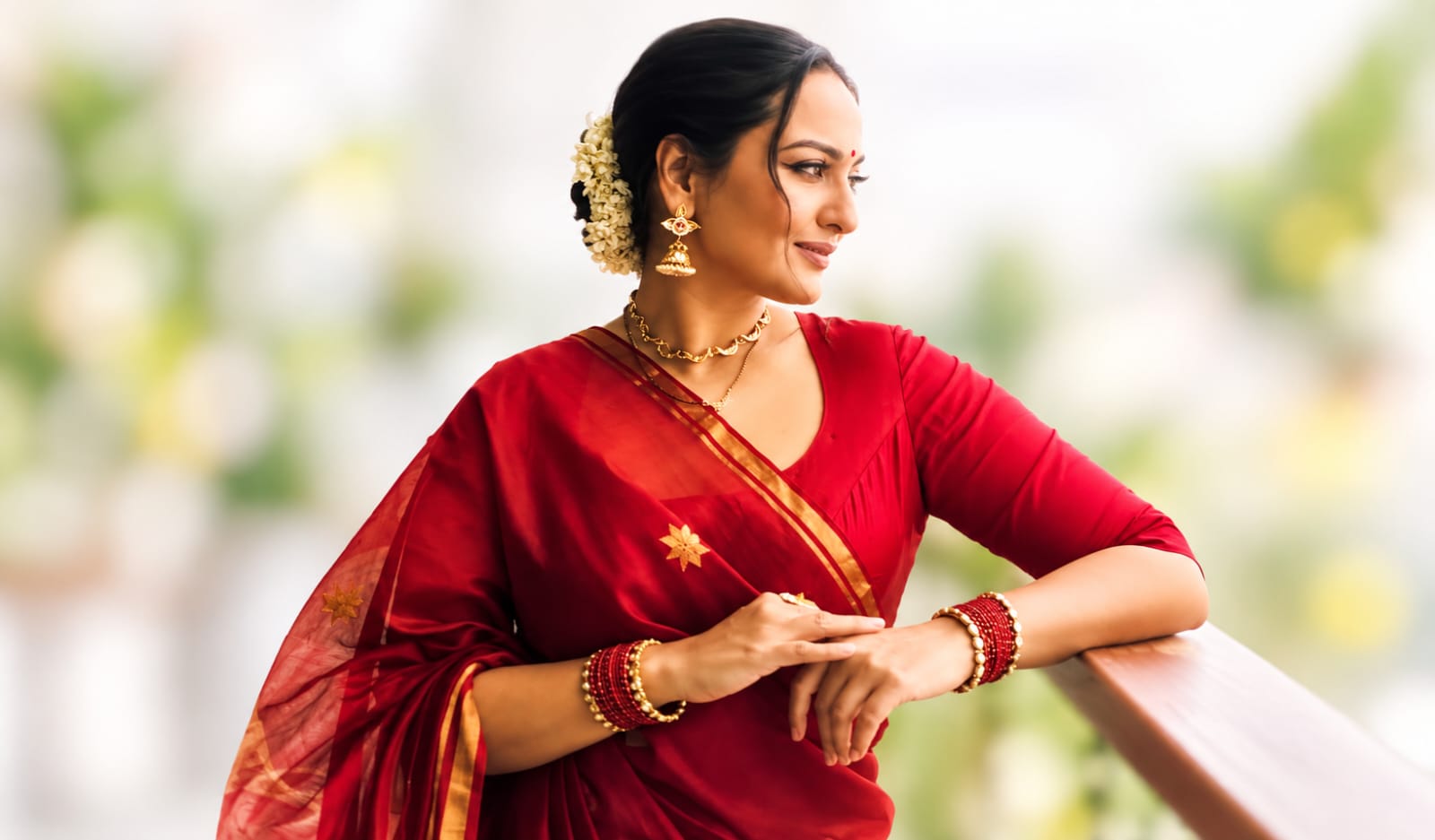
Actress Sonakshi Sinha shared photos in a red saree, revealing she wore the traditional attire for the first time since her wedding in June 2024. The saree was gifted by friend and ‘Double XL’ co-star Huma Qureshi
Mumbai: Actress Sonakshi Sinha recently opened up about wearing a saree after a long gap. She revealed that the last time she donned the traditional attire was on her wedding day.
Sharing her thoughts on Instagram, the ‘Akira’ actress wrote, “The last time i wore a saree was when i got married… felt nice wearing one after so long.” The actress also revealed that the saree was gifted to her by her dear friend and her ‘Double XL’ co-star Huma Qureshi.
In the photos, Sonakshi could be seen striking different poses in a red saree, which she paired with matching bangles and earrings. She wore her hair in a bun adorned with gajra and completed her traditional look with a mangalsutra and sindoor.
For her makeup, the actress opted for a soft look with nude lipstick. She was seen posing on her balcony, flaunting her elegant traditional ensemble.
Sonakshi Sinha has often shown her love for the timeless saree. From choosing her mother’s vintage Chikankari saree for her wedding to embracing a classic red Banarasi for her reception, the ‘Dabangg’ actress has given traditional drapes a special place in her wardrobe.
For her wedding to Zaheer Iqbal in June 2024, Sonakshi Sinha chose a traditional saree that reflected timeless Indian style and family memories. She wore a 44-year-old ivory Chikankari saree that belonged to her mother, Poonam Sinha.
The pure silk georgette saree featured delicate hand-embroidered Chikankari work. For her grand wedding reception, Sonakshi opted for a bright crimson-red Banarasi silk saree from designer Sanjay Garg’s label Raw Mango.
The saree, called the ‘Chand Buta’, was made from pure Katan silk and featured gold crescent and floral motifs along with a heavy zari border.
She completed the bridal look with an emerald-and-gold choker, statement jhumkas and traditional red chura bangles. Sonakshi Sinha married her long-time partner Zaheer Iqbal in an intimate ceremony in Mumbai on June 23, 2024.